

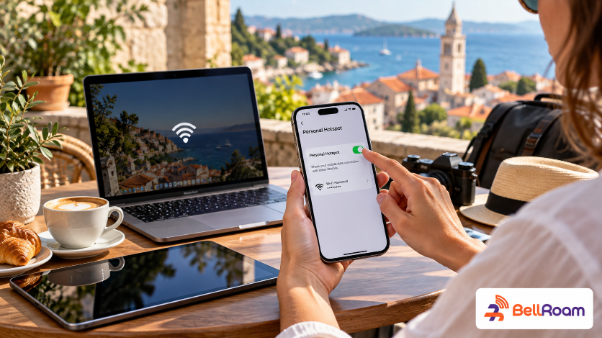
Traveling abroad with multiple smart devices often requires maintaining continuous internet connectivity across laptops, tablets, and secondary smartphones. Whether you are a digital nomad needing to complete remote work assignments, a family sharing a single data connection, or a tourist navigating unfamiliar streets, mobile hotspot capabilities provide incredible convenience.
However, many international travelers wonder whether prepaid travel cellular profiles support personal hotspot tethering while overseas. Understanding how tethering functionality works, potential speed restrictions, and data management strategies ensures you stay connected seamlessly. This detailed guide explores everything you need to know about using a personal hotspot with a travel embedded SIM.
1. How Personal Hotspot Tethering Works with Digital Travel SIMs
Personal hotspot functionality allows your smartphone to share its cellular data connection with nearby Wi-Fi-enabled devices. When tethering is active, your smartphone acts as a portable wireless router, broadcasting a local Wi-Fi signal to connect laptops, tablets, and secondary phones.
Using tethering with a digital travel profile functions identically to standard mobile data sharing on domestic networks. Your device receives high-speed cellular data from foreign partner networks and broadcasts it wirelessly to your connected hardware without requiring additional cables or external pocket Wi-Fi hardware.
Can You Use Personal Hotspot with a Travel eSIM? Key Things You Should Know
Most modern smartphones support seamless tethering across both physical SIM cards and digital cellular profiles. As long as your digital profile permits data sharing, enabling personal hotspot within your settings menu takes only a few simple taps.
2. Checking Provider Terms: Not All Travel Plans Allow Hotspot Sharing
While the majority of international digital profiles allow personal hotspot usage, tethering permissions depend entirely on carrier plan terms. Certain budget connectivity providers restrict or completely block mobile hotspot sharing on specific low-cost or unlimited data plans.
Carriers implement tethering restrictions to prevent network congestion caused by excessive data consumption across multiple connected devices. Attempting to enable personal hotspot on a plan that forbids tethering may result in connection error messages or complete data throttling.
Specialized global connectivity providers like BellRoam offer transparent travel data packages that fully support hotspot tethering. Reviewing package specifications prior to completing your purchase ensures your chosen data plan permits multi-device tethering throughout your journey.
3. Impact of Hotspot Sharing on Data Consumption and Battery Life
Tethering secondary devices to your smartphone significantly accelerates mobile data consumption compared to single-device browsing. Laptops and tablets automatically perform background system updates, cloud photo syncs, and desktop website rendering, which consume substantial bandwidth within minutes.
Furthermore, running continuous wireless tethering places a heavy processing load on your smartphone hardware, leading to rapid battery depletion. Prolonged hotspot sessions can also cause device heating, which may temporarily reduce charging speeds or overall system performance.
To manage battery drain, consider connecting your smartphone to a portable power bank during extended tethering sessions. Additionally, monitoring data usage on connected laptops prevents accidental background downloads from depleting your prepaid high-speed internet allocation prematurely.
4. How to Configure Hotspot Settings and APN Parameters Correctly
Configuring your mobile hotspot requires proper device setup to ensure connected devices receive stable internet routing. Open your smartphone settings menu, navigate to cellular data options, and select the personal hotspot tab to configure your network name and secure password.
In certain instances, tethering may fail to connect secondary devices even when hotspot is enabled in your settings. This operational issue usually occurs when Access Point Name (APN) settings for cellular data sharing remain incomplete or misconfigured following initial profile installation.
To resolve APN tethering issues manually, check your digital profile setup instructions for specific hotspot APN text strings. Entering the designated APN string into the cellular data settings menu guarantees proper traffic routing across all tethered devices.
5. Essential Tips for Optimizing Hotspot Usage While Traveling
Maximizing the value of your shared mobile internet connection involves applying smart device configurations across all connected hardware. Before enabling your personal hotspot, turn on low data mode on your secondary devices to pause automatic software updates and cloud backups.
Disconnect secondary devices from your mobile hotspot as soon as you finish essential tasks like checking emails or navigation. Leaving laptops connected continuously allows background applications to refresh silently, consuming valuable high-speed data while your phone sits idle.
Furthermore, utilize password protection with strong encryption standards on your personal hotspot network to prevent unauthorized access. Keeping your mobile hotspot secure prevents nearby travelers from tapping into your prepaid data bandwidth without your knowledge.
Conclusion
Using a personal hotspot with a travel eSIM is a fast, safe, and efficient way to keep all your electronic devices connected abroad. By selecting a provider that permits tethering, monitoring data consumption, and securing your network, you enjoy uninterrupted productivity throughout your international travels.
Eliminate expensive carrier roaming fees and portable router rentals by upgrading your global mobile strategy today. Secure your high-speed travel data plan before your next journey begins and experience truly seamless, multi-device connectivity wherever you travel!
Company Information / Contact Details
- Brand Name: BellRoam
- Website: https://bellroam.com/
- Address: Unit 308, 3/F, Chevalier House, 45-51 Chatham Road South, Tsim Sha Tsui, Hong Kong
- Phone: +44 7862 604379
- Email: [email protected]
